Live Trading Bot · Real money · Limited access
Alerts Pro Live Trading turns Gap, Momentum and Swing alerts into limit-order bracket trades at a brokerage account operated by Alerts Pro, with a stop and target on every order, hard dollar limits, a daily loss halt and a kill switch. It starts paused and only trades when Alerts Pro switches it on.
The Alerts Pro Live Trading Bot is the automated desk Alerts Pro operates on its own brokerage account. It places limit-order bracket trades from Gap, Momentum and Swing alerts within hard dollar limits, a daily loss halt and a kill switch, and it starts paused. It uses real money and carries risk of loss; no returns are promised.
Stop + target on every order
Bracket orders placed at the broker
Hard dollar limits
Caps, daily orders, daily loss halt
Kill switch + Close all
Everything can be halted instantly
Starts paused
Nothing trades until Alerts Pro turns it on
Real money, real risk. You can lose some or all of your capital; results vary and none are promised. Live Trading is currently limited to the admin account and is planned for Full Desk members; the Full Desk trial includes simulated Paper Trading today. Not financial advice. Alerts Pro is not a broker and does not hold customer funds.
Why use it
Concrete things the desk does, not promises about returns. Every feature below is part of the Live Trading desk.
Each entry is a bracket order: the stop-loss and profit target are attached at the broker when the order is placed, so a position is not left without an exit level.
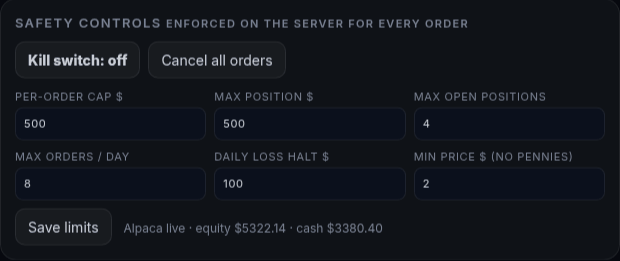
Per-order cap, max position size, max open positions, daily order limit, daily loss halt and a minimum price. Enforced on the server before any order is sent.
One tap stops all new orders and cancels open ones. Close all positions market-closes everything after a confirmation. Both are controlled by Alerts Pro.
A new desk takes no trades until Alerts Pro turns it on. Pause any time: paused accounts take no new entries but still manage open positions.
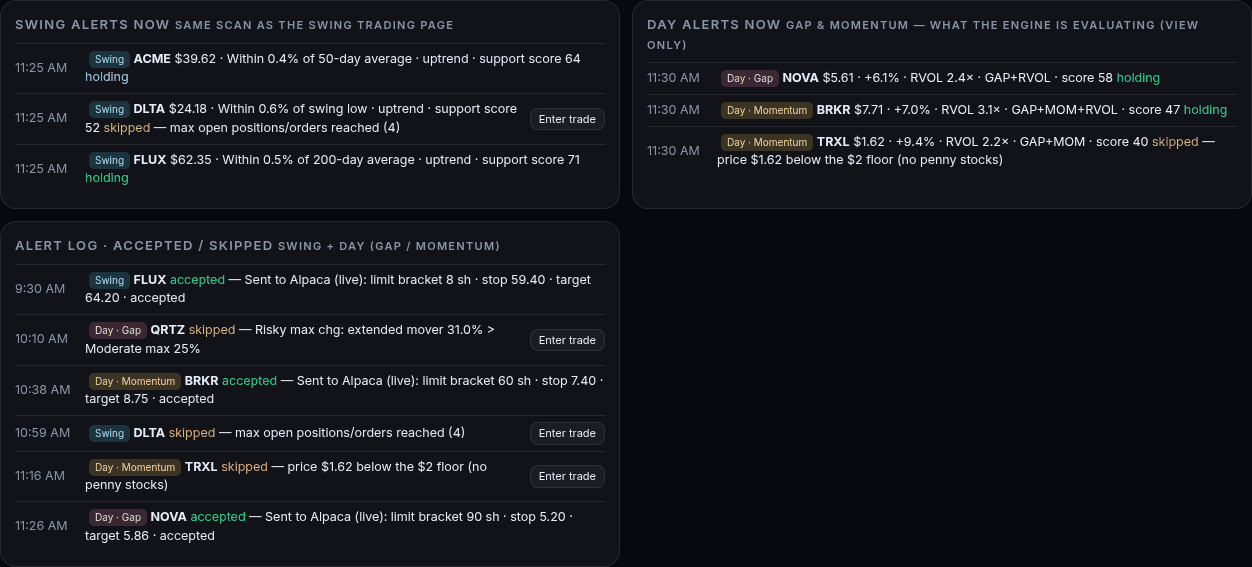
Gap and Momentum alerts are evaluated through the regular session; Swing alerts are scanned every 5 minutes. No screen-watching needed.
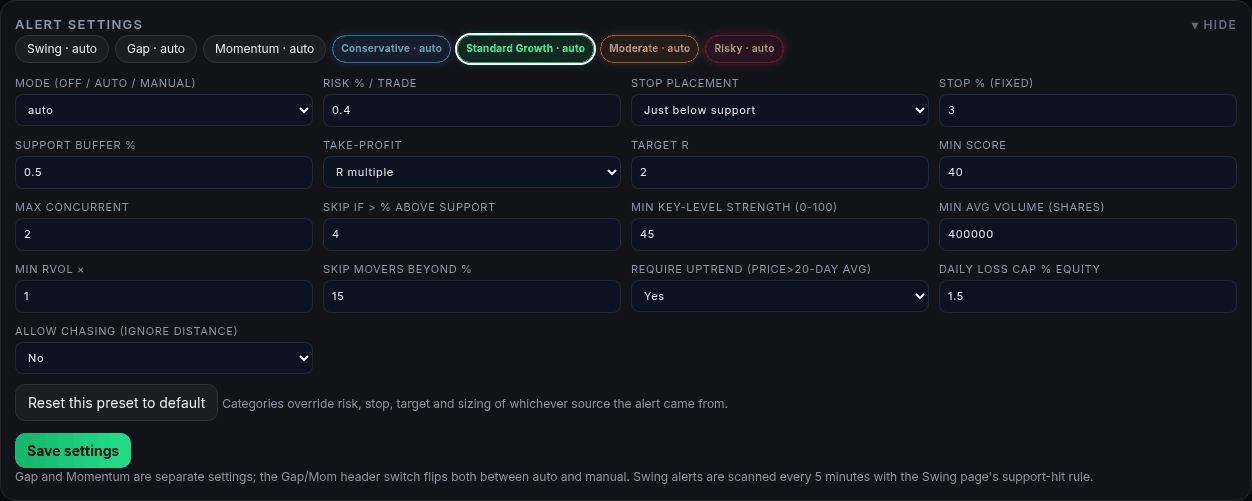
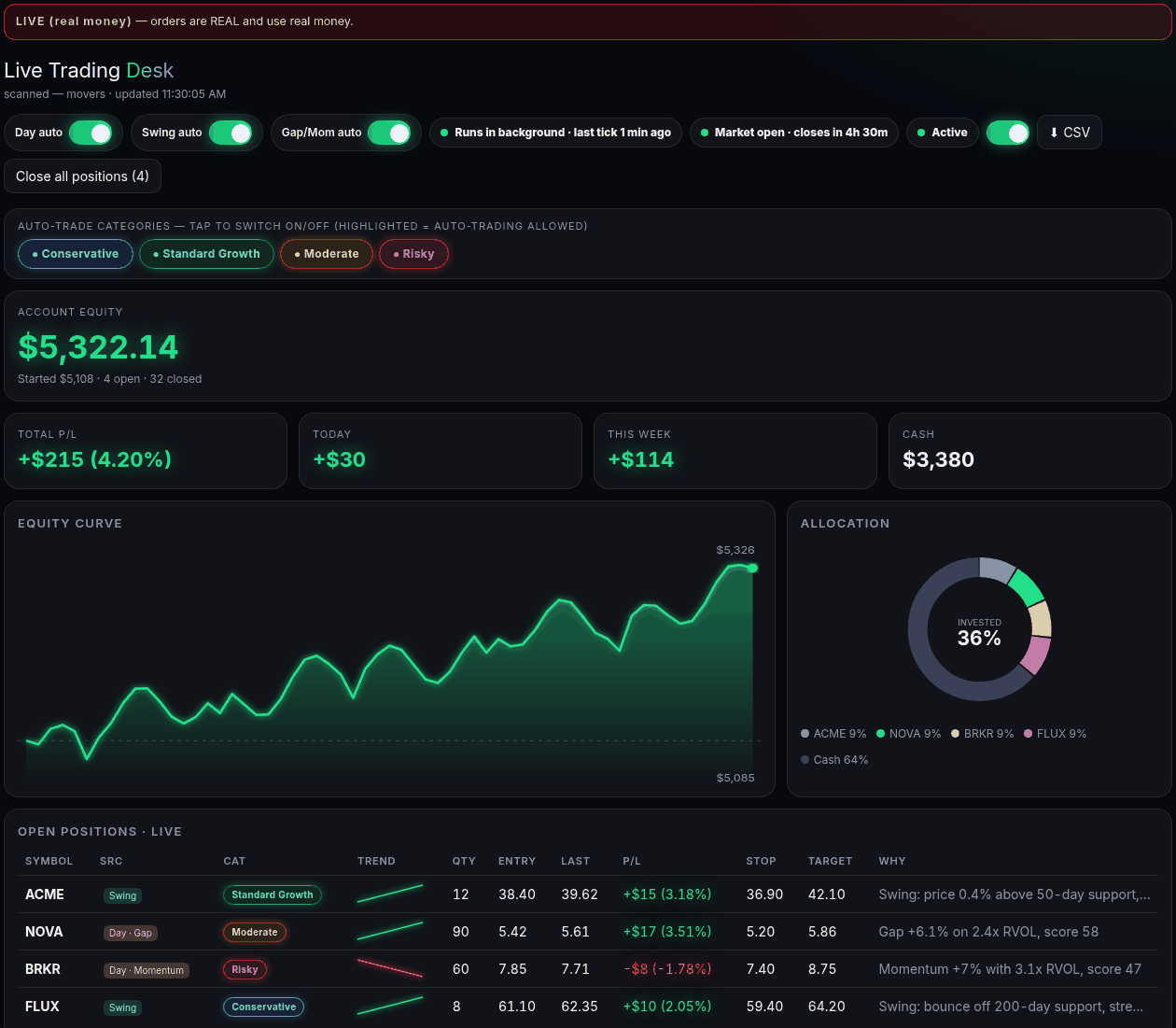
Conservative, Standard Growth, Moderate and Risky each have their own risk per trade, stop, target and filters. Switch any category on or off.
Day auto and Swing auto switches limit the desk to only short-term Gap/Momentum, only Swing, or both. Day trades are flat by 3:55 pm ET.
The alert log records each decision with its reason, for example a daily-loss halt, a price below the floor or a position cap reached.
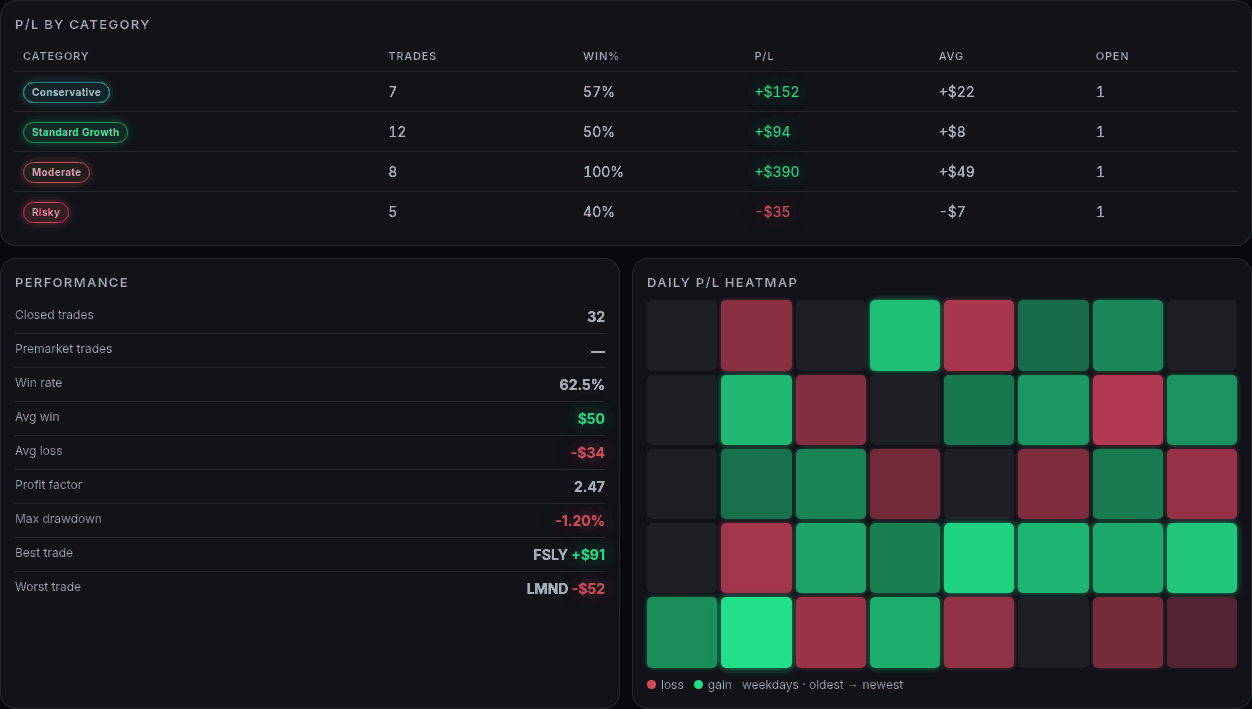
Total, today and this week in dollars and %, P/L by category and by Day/Swing source, a daily heatmap, a trade log and CSV export.
It learns from how alerts played out and applies only small, hold-out-checked score adjustments after a warm-up. Auto-tune can be turned off or reverted.
Alerts Pro is software, not a broker, and does not hold funds. Orders are placed through a brokerage account operated by Alerts Pro; customers do not connect or use their own account.
Mode (auto, manual or off), entry, stop, target, minimum score, price range, size, hours and more, per source and per category.
Inside the desk
These screenshots are the real Live Trading interface rendered with made-up example data (example account, example symbols and figures). They are not actual results and not a forecast.


How it works
The desk is operated by Alerts Pro on its own small brokerage account. Broker keys are kept as server-side secrets, never in your browser, and customers do not connect or access the account.
Alerts Pro sets the per-order cap, position size, open positions, daily orders and daily loss halt, and which risk categories and which of Day and Swing may trade.
The desk starts paused. When Alerts Pro turns it on, it evaluates alerts, places limit-order bracket trades within those limits and manages open positions. It can be paused or killed any time.
An alert fires
Gap (+4% gap) or Momentum (+5% with 1.5x relative volume) from the live scan, or a Swing support-hit (price within 0.75% of the 50/200-day or a swing low, uptrend, support score 40+).
It is scored and categorized
The alert gets a score, is placed in a risk category, and the learned edge (once active) can nudge the score by a small, capped amount.
Rules are checked
Source and category switches, score, price range, distance from support, position caps, portfolio open-risk cap (3% of equity) and the dollar limits. The reason is logged either way.
A bracket order is sent
If it passes, a limit entry 0.2% above the alert price goes to the broker with a stop-loss and a profit target attached. Size is capped by the per-order and position limits and by available cash.
It is managed to the exit
The stop or target closes the trade at the broker. Day trades are flat by 3:55 pm ET; Swing trades are held until the stop, target or maximum hold. P/L is tracked in dollars and %.
Day and Swing
Highest score and key-level strength bars, entries close to support, stop just below support. Smallest default risk per trade (0.2% of equity).
Balanced filters with support-based stops. Default risk per trade 0.4% of equity.
Looser filters, wider fixed-percent stops, larger moves and cheaper stocks allowed. Default risk 0.5% of equity.
Lowest bars, wide stops, may chase extended moves. Highest default risk per trade (1% of equity) and the highest chance of large losses.
Safety controls
Limits are checked on the server each time the engine is about to send an order. A new desk starts with conservative defaults, and Alerts Pro can adjust each one within the ranges below.
| Limit | Default | Range | What it does |
|---|---|---|---|
| Per-order cap | $50 | $10 to $5,000 | Largest dollar size of a single entry. |
| Max position | $50 | $10 to $10,000 | Largest dollar size of one position. |
| Max open positions | 2 | 1 to 10 | Open positions plus working orders. |
| Max orders per day | 4 | 1 to 50 | Counted per trading day (ET). |
| Daily loss halt | $15 | $5 to $2,000 | New entries stop once the account is down this much today. |
| Minimum price | $2 | $1 to $50 | No penny stocks below the floor. |
Stops all new orders and cancels every open order at the broker. Open positions are kept until closed or their stop or target is hit.
Cancel all orders leaves positions open. Close all positions market-closes every position and cancels working orders. Both ask for confirmation.
Only active, tradable US equities on listed exchanges (no OTC), one position or order per symbol, per-category position caps and daily loss caps, and a 3% of equity portfolio open-risk cap.
Learning engine
It is a bounded score multiplier, not a prediction, and it does not guarantee better results.
Track everything
Positions, orders and fills are synced from the broker, which is the source of truth.
Availability and plan
Live Trading is currently limited to the admin account and is planned for Full Desk members after the paper phase is signed off. It is not available to subscribers today. Full Desk is $49/month with a 7-day free trial (card required) and includes simulated Paper Trading, Calculator, Portfolio and Congressional Trades.
It is the real-money Live Trading desk in Alerts Pro. It turns Alerts Pro Gap, Momentum and Swing alerts into limit-order bracket trades (entry, stop-loss and profit target) through a brokerage account operated by Alerts Pro, inside hard limits set by Alerts Pro.
Not yet. Live Trading is currently limited to the admin account and is planned for Full Desk members after the paper phase is signed off. The Full Desk plan ($49/month, 7-day free trial with card required) includes simulated Paper Trading today.
Yes. In live mode the orders are real orders placed through a small brokerage account operated by Alerts Pro, using real money. The desk shows a LIVE (real money) banner in live mode and a PAPER banner when it is pointed at a paper account.
No. Customers do not connect any brokerage account and nothing is traded with customer money. The desk is operated by Alerts Pro on its own small account, with broker keys kept server-side. Alerts Pro is software, not a broker, and does not hold customer funds; orders are executed by the broker.
Entries are limit orders priced 0.2% above the alert price, sent as a bracket order with a stop-loss and a profit target attached at the broker. Exits triggered by the engine, Close all and stop-loss fills are market-style exits, so they can fill at a different price than shown.
No. A new Live Trading desk starts paused. Nothing is entered until Alerts Pro switches the engine on, and it can be paused or stopped with the kill switch at any time.
A per-order dollar cap, a maximum position size in dollars, a maximum number of open positions, a daily order limit, a daily loss halt in dollars and a minimum share price. These limits are enforced on the server before each order is sent.
When the desk account is down by at least the configured dollar amount for the day, the engine stops opening new trades for the rest of that day.
It stops all new orders and cancels every open order at the broker. Positions that are already open are kept until they are closed or their stop or target is hit. Close all positions is a separate button that market-closes everything after a confirmation.
Day trades come from Gap and Momentum alerts, are opened in regular hours only and are flattened by 3:55 pm ET (no overnight). Swing trades come from the Swing support-hit scan and are held until the stop, target or maximum hold. Separate Day auto and Swing auto switches turn each style on or off.
Every alert is placed into Conservative, Standard Growth, Moderate or Risky. Each category has its own risk per trade, stop, target and filters, and Alerts Pro can switch any category on or off.
A learning engine records how alerts played out, including closed trades and simulated outcomes of skipped alerts. After a warm-up it applies a small, bounded score adjustment, and only if it does not worsen results on the newest data. It is not a prediction and does not promise better results.
No one can promise that. Automated trading can lose money, including all of your capital. Results vary and past or example results do not guarantee future results. Nothing on this page is financial advice.
The Full Desk plan ($49/month, 7-day free trial) includes Paper Trading, the same style of engine with simulated money. Live Trading is limited access today.
Risk disclosure: trading stocks involves substantial risk of loss, including the loss of your entire investment. The Live Trading desk uses real money in a small brokerage account operated by Alerts Pro; customers do not trade through it. Automated trading can lose money, results vary, and no returns are promised or implied. Stop orders can fill at worse prices than expected. Past, simulated or example results do not guarantee future results. Alerts Pro is software, not a broker, investment adviser or financial advisor, and does not hold customer funds; orders are executed by the broker. Nothing on this page is financial advice or a recommendation to buy or sell any security.
Enter the email you subscribed with. If it has an active subscription we'll email a one-time sign-in link (valid 15 minutes).
Full desk — 7-day free trial, then $49/mo
Card required. You won't be charged for 7 days; after that you're billed $49/mo unless you cancel.
Secure checkout via Stripe. Email is optional — it pre-fills the Stripe form.